B2B Enterprise UX Case Study
Salesforce Sales Console Redesign
Transforming the sales workflow experience to increase productivity and drive revenue growth
Role
Lead UX Designer
Duration
6 Months
Platform
Salesforce
Team
3 Designers, 5 Developers
Overview
The Challenge
Sales representatives at a t B2B company were struggling with a
fragmented Salesforce interface that required multiple screens, excessive
clicks, and lacked real-time visibility into critical metrics. This resulted in
reduced productivity and missed sales opportunities.
The existing system was built over several years with different teams adding
features without a cohesive design strategy, leading to inconsistent user
experiences and inefficient workflows.
The Solution
We redesigned the Sales Console to provide a unified, streamlined experience that consolidates key information, reduces cognitive load, and enables sales reps to complete their daily tasks more efficiently.
The new design features intelligent dashboards, contextual information display, and simplified workflows that adapt to different sales scenarios.
Problem Statement
“Sales representatives need a more efficient way to manage their daily activities because the current system requires too many steps to access critical information, leading to decreased productivity and missed revenue opportunities."
35%
Time wasted navigating between screens
12+
Average clicks to complete an order
67%
Users reported frustration
Research & Discovery
Research Methods
User Interviews
15 sales reps across 3 regions
Contextual Inquiry
8 on-site observations
Analytics Review
3 months of usage data
Usability Testing
12 users, 3 rounds
Key Findings
1
Cognitive Overload During Peak Hours
Sales reps experienced decision fatigue managing 40+ calls
daily across fragmented interfaces. Heat mapping revealed
73% abandoned critical fields during high-pressure periods.
2
Hidden Customer Context Impacts
Conversion
Purchase history and preferences required 8+ clicks to
access. A/B testing showed 34% higher close rates when
this data was surfaced contextually during calls.
3
Mobile Access Creates Shadow
Workflows
67% of reps admitted using personal spreadsheets and
note apps because the platform wasn't mobile-optimised,
creating data silos and compliance risks.
4
Novice vs Expert Performance Gap
New hires took 6-8 weeks to reach proficiency. Task analysis
revealed the interface lacked progressive disclosure,
forcing beginners to navigate expert-level complexity.
Design Process
Phase 1
Discovery & Research
Conducted comprehensive user research including interviews,
contextual inquiries, and analytics review to understand pain points
and user needs.
15 user interviews
8 contextual inquiries
Competitive analysis
Phase 2
Ideation & Wire-framing
Created multiple design concepts focusing on information architecture
and workflow optimization. Collaborated with stakeholders to refine
solutions.
User journey mapping
Low-fidelity wire-frames
Stakeholder workshops
Phase 3
Prototyping & Testing
Developed high-fidelity prototypes within Salesforce and conducted
iterative usability testing to validate design decisions.
Interactive prototypes
3 rounds of usability testing
Design refinements
Phase 4
Implementation & Roll-out
Worked closely with development team to ensure design fidelity and
created comprehensive documentation for training and adoption.
Design system documentation
Phased roll-out to users
Training materials
Design Principles
Information Hierarchy
Prioritize the most critical information
and actions based on user workflows
and business goals.
Efficiency First
Minimize clicks and reduce cognitive
load by consolidating related information
and streamlining workflows.
Contextual Awareness
Display relevant information based on
user context and provide easy access to
supporting details.
User Flow Analysis
We mapped out critical user journeys to identify bottlenecks and opportunities for optimization. The analysis revealed significant inefficiencies in the order creation process that we addressed through workflow consolidation and intelligent defaults.
Task Flow: Creating a New Order
Before Redesign
Screens
7
Clicks
14
Time
8-10 min
1
Login to Salesforce
Navigate to Salesforce homepage
2
Navigate to Accounts
Search for the customer account
3
View Customer Details
Review account information in separate screen
4
Navigate to Orders
Switch to Orders section from Account
5
Open Product Catalog
Search and select products
6
Enter Order Details
Manually input order information
COGNITIVE LOAD
HIGH
After Redesign
Screens
2
Clicks
5
Time
3-4 min
1
Access Unified Dashboard
All customer context readily available
2
Quick Order Creation
Streamlined product selection
3
Review & Submit
One-click order confirmation
COGNITIVE LOAD
MINIMAL
71%
Fewer Screens
64%
Fewer Clicks
60%
Time Saved
50%
Step Reduced
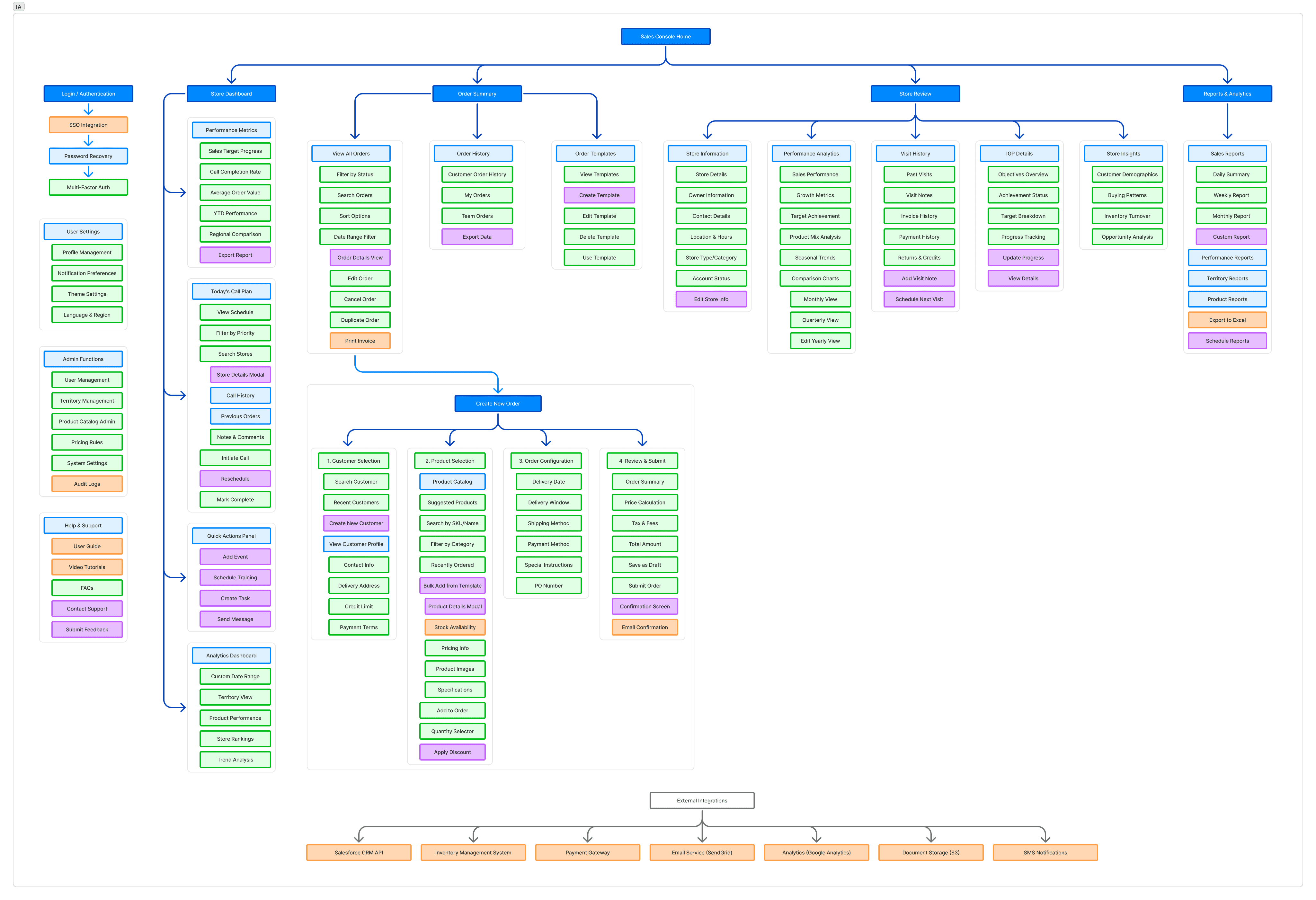
Detailed Information Architecture
Complete sitemap showing all screens, features, and navigation paths within the redesigned Salesforce Sales Console
Primary Screen
Secondary Screen
Action/Feature
Modal/Overlay
External Integration
12
Primary Screens
45+
Secondary Screens
150+
Features & Actions
7
External Integrations
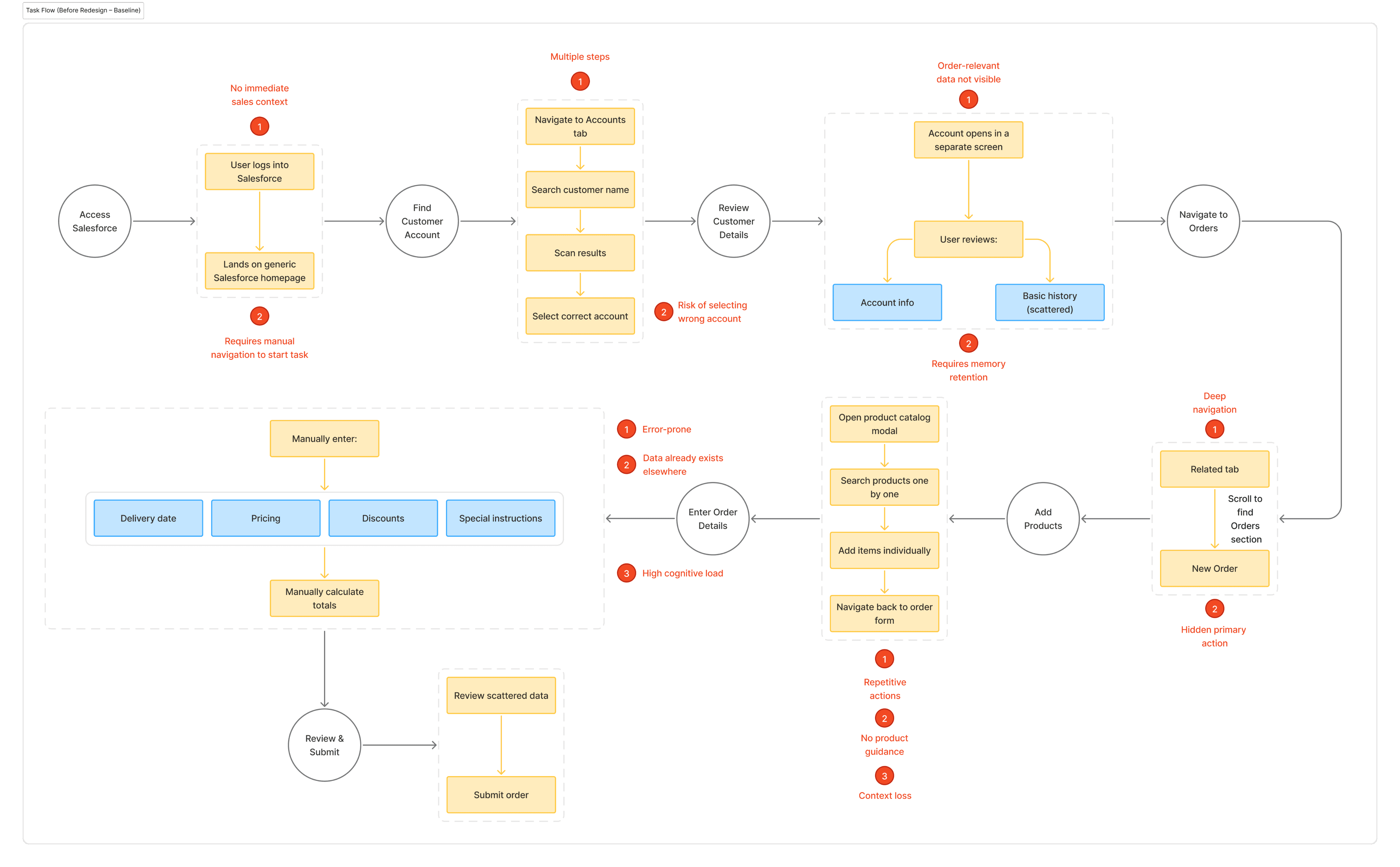
Behavioural Friction & Baseline Task Flow
Complete diagnostic mapping of the legacy Salesforce journey, highlighting the psychological and operational barriers that resulted in high
cognitive load and manual error rates.
Phase Milestones / User Objectives
Standard System Interactions
Secondary Data Contexts / sub-information sets
22+
Manual Interactions
14
Decision Points
06
Context Switches
03
High-Risk Stages
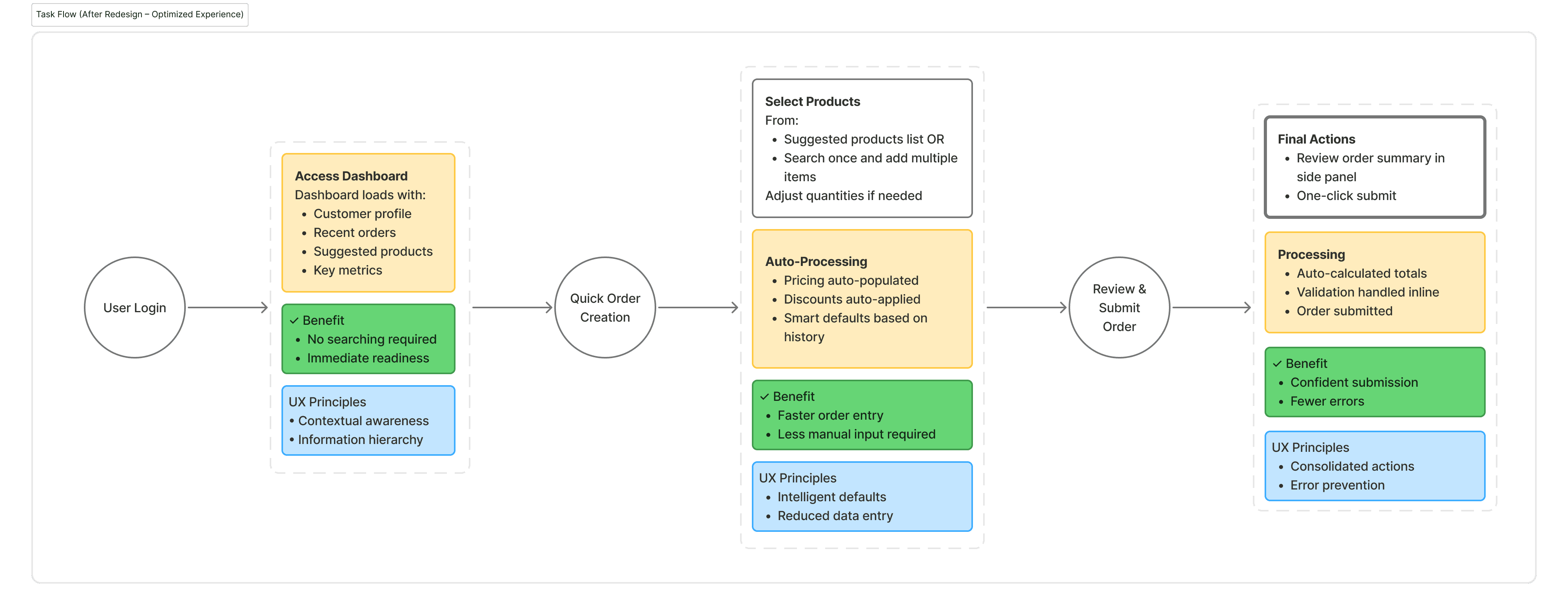
Unified Sales Dashboard - User Flow
Optimised Behavioural Architecture: A predictive, high-efficiency user flow designed to eliminate cognitive friction and streamline the B2B sales cycle
within the Salesforce ecosystem.
System Behaviour
User Value
UX Principles
64%
Fewer Clicks
60%
Time Saved
42%
Productivity Increase
89%
User Satisfaction
$2.4M
Annual Operational Savings
Key Flow Improvements
Reduced Navigation Depth
Flattened information architecture from 4-5 levels to 2-3 levels,
making all features accessible within 2 clicks.
Contextual Information
Related data appears automatically based on user context,
eliminating the need to search for information.
Intelligent Defaults
System pre-fills forms with smart defaults based on historical
data and user patterns.
Consolidated Actions
Multiple related actions grouped together, reducing screen switching
and maintaining user focus.
Design Solutions
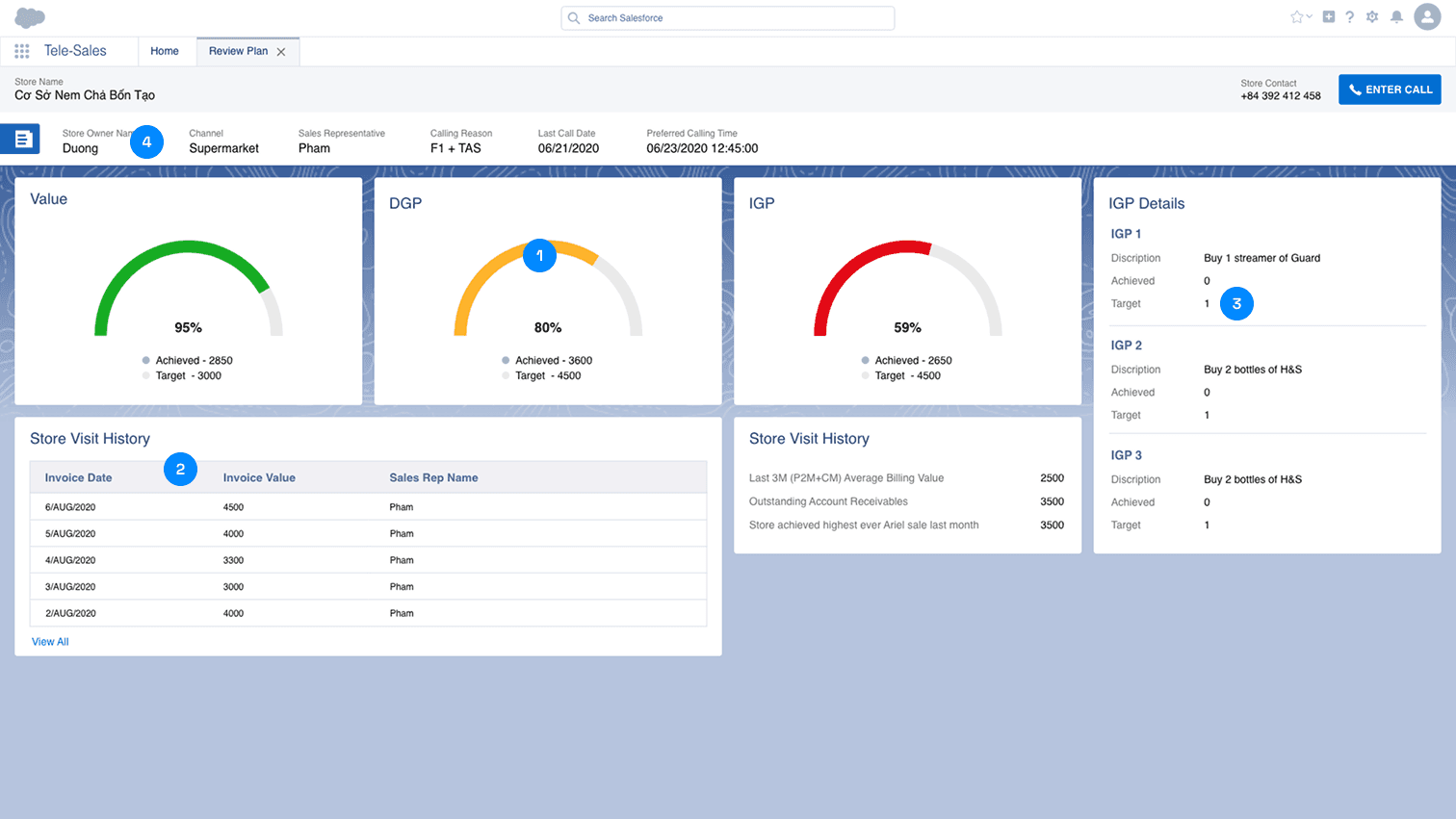
1. Store Review & Analytics
Created a focused view for reviewing individual store performance with actionable insights and historical data.
1
Circular Progress Indicators
Visual gauge charts make it easy to assess performance
against targets at a glance.
2
Store Visit History
Historical invoice data helps reps understand purchase
patterns and opportunities.
3
IGP Details Breakdown
Detailed objectives with clear descriptions and achievement
status.
4
Store Owner Context
Key store information and contact details prominently displayed
for quick reference.
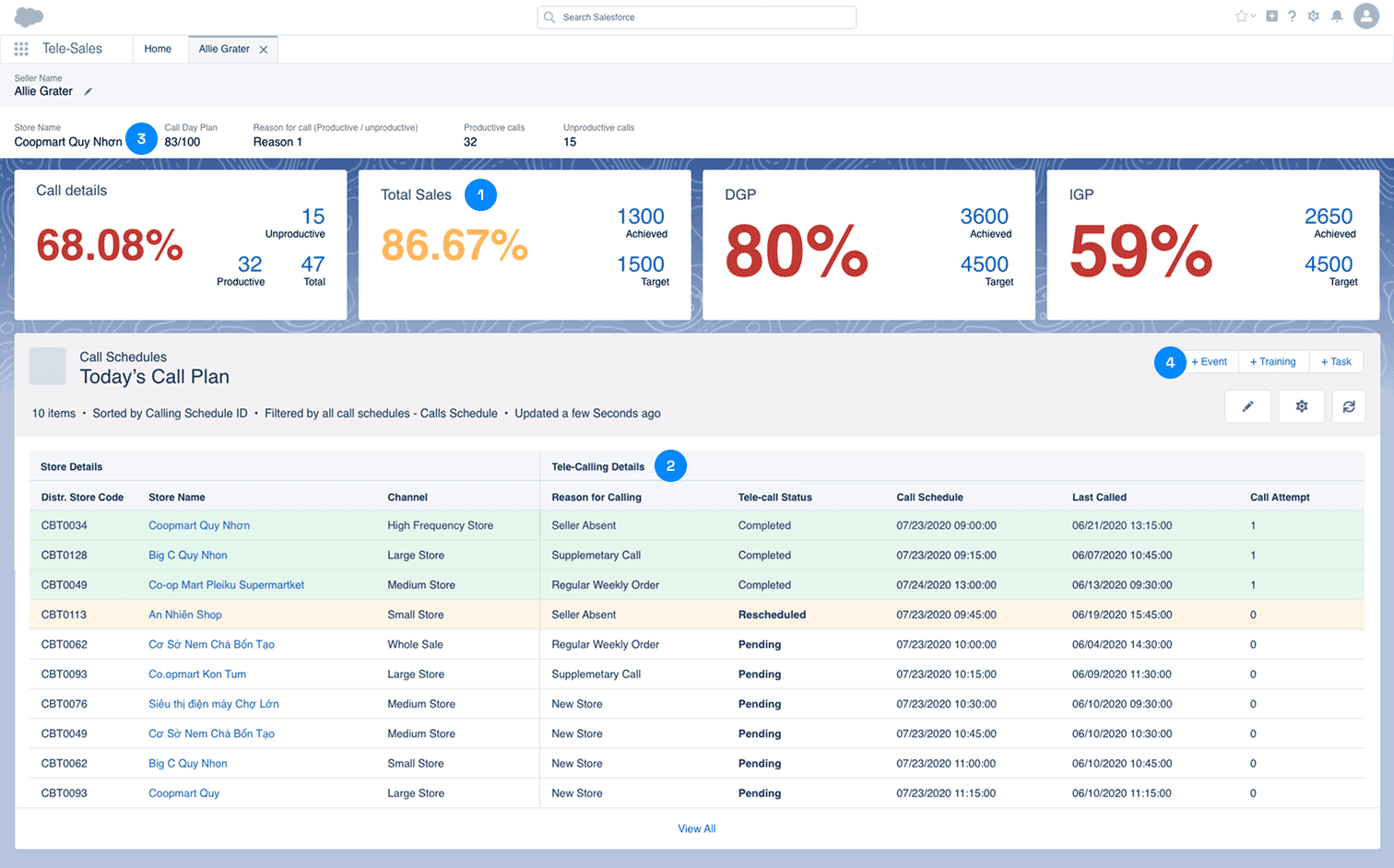
2. Intelligent Tele-Sales Dashboard
Redesigned the sales representative interface to surface critical performance metrics and streamline call management workflows.
1
Performance Metrics Cards
Real-time KPIs displayed with large, readable percentages and
clear progress indicators.
2
Today's Call Plan
Comprehensive call schedule with all necessary information to
prepare for each call.
3
Store Information
Quick access to store details and calling reasons at the top for
context.
4
Action Buttons
Quick actions for adding events, training, and tasks without
leaving the page.
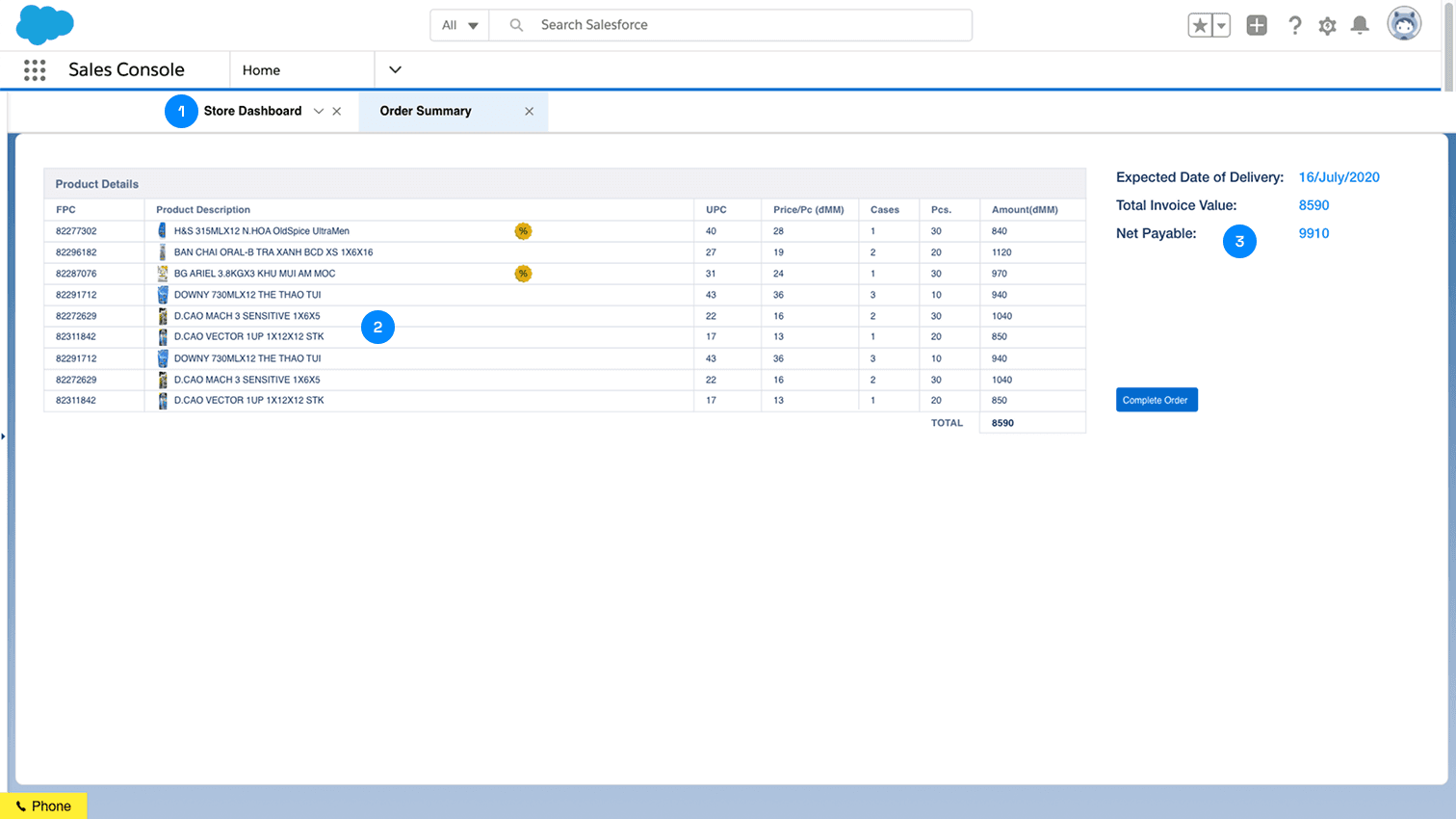
3. Unified Product Dashboard
Consolidated order summary and product details into a single, comprehensive view that eliminates screen switching and reduces cognitive load.
1
Tabbed Navigation
Quick access to Store Dashboard and Order Summary without
leaving the context.
2
Detailed Product Grid
All product information visible at a glance with clear column
headers and visual indicators.
3
Contextual Summary Panel
Key order metrics displayed prominently for quick decision making.
Results & Impact
42%
Increase in productivity
Sales reps complete orders
faster with streamlined workflows
65%
Reduction in clicks
From 12+ clicks to 4 clicks to
complete an order
89%
User satisfaction
Post-launch survey shows high
satisfaction rates
$2.4M
Annual savings
In operational efficiency and
reduced errors
Qualitative Feedback
“The new interface saves me at least 2 hours every day. I can see everything I need without jumping between screens."
— Sales Representative, Northeast Region
“The dashboard gives me real-time visibility into my performance. I know exactly where I stand against my targets throughout the day."
— Tele-Sales Manager, West Region
“Training new reps is so much easier now. The interface is intuitive and they can start being productive on day one."
— Sales Operations Director
Key Learnings
Enterprise Users Value Efficiency Above All
B2B users prioritize speed and efficiency over aesthetic design. Every
click saved and screen eliminated directly impacts their daily productivity
and satisfaction.
Context is Critical in Complex Workflows
Providing contextual information at the right time reduces cognitive
load and helps users make better decisions. The redesign focused on
surfacing relevant data based on user actions.
Iterative Testing is Essential
Multiple rounds of usability testing with actual sales reps revealed
insights that wouldn't have been apparent otherwise. Each iteration
refined the solution significantly.
Stakeholder Alignment Drives Success
Regular workshops with sales managers, IT teams, and executives
ensured the solution met business goals while solving user pain points.
Next Steps & Future Enhancements
Planned Enhancements
AI-powered product recommendations based on store history and
trends.
Mobile app for field sales representatives.
Advanced analytics dashboard for sales managers.
Integration with inventory management system for real-time stock
visibility.
Continuous Improvement
Monthly user feedback sessions to identify new pain points.
Quarterly analytics reviews to track usage patterns and adoption.
A/B testing of new features before full roll-out.
Expansion to additional sales teams and regions.
Conclusion
This redesign transformed a fragmented, inefficient sales console into a streamlined, user-centric
platform that empowers sales representatives to work faster and more effectively. By focusing on user
needs, simplifying workflows, and providing contextual information, we delivered measurable business
value while significantly improving user satisfaction.
Impact: 500+ active users | 42% productivity increase | $2.4M annual savings